
Visa Photo Maker
2-minute process
Fill in the fields and submit.
Done from home
No going to photo studios!
Correct Dimensions
Crop image according to country requirements.
Select Country
Upload photo
Download result
Select Destination
If your browser blocks the camera, you can still upload a photo in the next step.
A perfect visa photo can make all the difference in your application. But getting the size and background just right can be tricky. With the GVS Passport Size Visa Photo Maker, it’s easier than ever. Upload your photo, and we’ll adjust it in seconds—no need for a trip to the photo studio.
What is a passport-size photo?
A passport-size photo is a small, standardised photo that’s required for most visa applications. It helps immigration officials verify your identity. Different countries have different rules when it comes to photo size, background colours, and other specifications. Following these specific requirements is important to ensure a successful visa application.
How to create the perfect passport-size photo for your visa?
Steps to create and adjust your passport-size photo to meet visa requirements using passport photo maker:
-
Upload your photo in JPEG, JPG, or PNG format.
-
Click ‘Transform’ to resize and adjust your photo.
-
Download your ready-to-use passport-size photo.
Why use the GVS passport size photo maker?
- Quick and easy: Convert your photo into the perfect passport size, all for free, without the hassle of visiting a photo studio or booth.
- Perfectly prepared: Your photo will be automatically adjusted to meet official visa requirements, ensuring a smooth application process.
- Reliable accuracy: Our tool is regularly updated with the latest guidelines, so your photo always meets the necessary standards.
- Easy access: Adjust your selfie photo anytime and anywhere directly from your tablet, laptop, or smartphone.
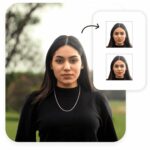
- Get two ready-to-use photos: Our free visa photo tool will automatically provide you with two passport-sized photos to use for your visa application.
Here’s an example of how our passport-sized visa photo maker will transform your regular photo into the ideal visa photo:

Advice for Applicants to Submit Proper Quality Photograph
The quality of the photograph appearing on the passport depends on the photograph that is submitted at the time of applying for a passport. The passport seekers are, therefore, advised to submit the photographs, asspecified,toavoiddelay inprocessing their passportapplications.
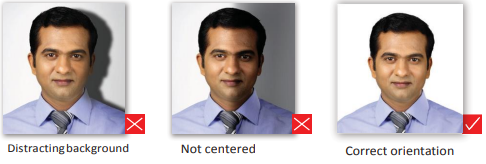
Sample Photo
- The photo print should be clear and with continuous-tone quality.
It should be full-face, front view, with eyes open.
- The photo should present the full head from the top of the hair to the bottom of the chin.
- Center the head frame.
- The background should be a plain white background.
- There should not be any distracting shadows on the face or on the background.
- The photograph must be taken in a colored attire, for example, a medium blue shirt etc.
- The attire should not be patterned/textured or pure white.
- Head coverings are not permitted for reasons, but the facial.
- Features from the bottom of the chin to the top of the forehead and both edges of the face must be clearly shown.
- The expression on the face should look natural.
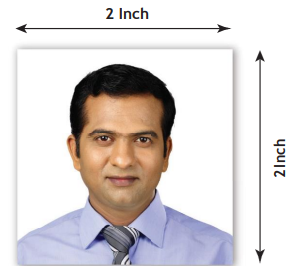
Do’s and Dont’s for a Proper photo
The photo should capture a full face, front view, with eyes open. The head should be in the center of the frame. There should be no distracting shadows on the face or background.


Make sure the photo presents a full head.
from top of hair to bottom of chin;
height of head should
measure 1 inch to 3/8 inches
(25 mm to 35 mm). Make sure eye
height is between11/8 inchesto11/3.
Lighting on face and background
The light should be even and balanced to avoid shadows on the face.
Background behind the face should be properly illuminated to avoid shadows in the background.